


0 C
New York
Monday, March 2, 2026

Buy now

spot_img
Home Blog Page 46

WebAssembly: The Key to Ultra-Fast Web Applications in 2025 – A Practical Developer’s Guide

Why WebAssembly is the future of web development?

In 2025, the expectations for web applications are higher than ever: speed, interactivity, and the ability to handle complex tasks directly in the browser. That’s where  WebAssembly (or Wasm) comes in, a technology that allows you to run high-performance code in a safe and portable way. Unlike JavaScript, which is interpreted, WebAssembly runs compiled code from languages ​​like C, C++, or Rust, bringing web performance close to that of native applications.

If you are a developer who wants to stand out, learning WebAssembly today is an investment for the future. In this article I will explain what it is, how it works and I will guide you step by step in a practical example to integrate it into a web project. Ready to make your applications lightning fast? Let’s get started!

What is WebAssembly and how does it work?

WebAssembly is a binary format that acts as a “virtual machine” for the web. It allows you to compile code written in high-performance languages ​​(Rust, C++, Go, etc.) into a format that can be run by major modern browsers such as Chrome, Firefox, and Safari. 


The main advantages of WebAssembly

  • Speed: Thanks to preemptive compilation, Wasm is much faster than JavaScript for intensive calculations.
  • Portability: Works on any platform that supports a modern browser.
  • Security: Runs code in a sandbox environment, providing protection against exploits.

But how does it integrate with the web? Simple: WebAssembly works hand in hand with JavaScript, allowing you to use Wasm for the performance-critical parts and JS for the general logic.

Hands-on Tutorial: Creating a Function with WebAssembly and Rust

To really understand WebAssembly, let’s get to work with a concrete example. We’ll create a simple function in Rust that adds two numbers, compile it into WebAssembly, and embed it in an HTML page.

Prerequisites

  • Install Rust: Visit this guide at the link and follow the instructions.
  • Install wasm-pack : Run cargo install wasm-pack in terminal.
  • A code editor (e.g. VS Code) and Node.js for the local server.

Step 1 – Set up your project

  1. Create a new directory: mkdir wasm-demo && cd wasm-demo .
  2. Initialize a Rust project: cargo new –lib wasm-lib && cd wasm-lib .
  3. Update the Cargo.toml file to add WebAssembly support:
[package]
name = "wasm-lib"
version = "0.1.0"
edition = "2021"

[lib]
crate-type = ["cdylib"]

[dependencies]
wasm-bindgen = "0.2"

Step 2 – Write the Rust code

Edit  src/lib.rs with this function:

use wasm_bindgen::prelude::*;

#[wasm_bindgen]
pub fn add(a: i32, b: i32) -> i32 {
    a + b
}

This code defines a function add that adds two integers and makes it accessible to JavaScript via wasm_bindgen .

Step 3 – Compile in WebAssembly

Run in terminal:

wasm-pack build --target web

This generates WebAssembly files in the pkg directory .

Step 4 – Embed into HTML

Create an  index.html file in the root of your project:

<!DOCTYPE html>
<html lang="it">
<head>
    <meta charset="UTF-8">
    <meta name="viewport" content="width=device-width, initial-scale=1.0">
    <title>WebAssembly Demo 2025</title>
</head>
<body>
    <h1>Calcolatrice WebAssembly</h1>
    <p>Risultato: <span id="result"></span></p>
    <script type="module">
        import init, { add } from './wasm-lib/pkg/wasm_lib.js';
        
        async function run() {
            await init();
            const result = add(5, 3);
            document.getElementById('result').innerText = result;
        }
        run();
    </script>
</body>
</html>

Result:  Step 5 – Test the result

Start a local server (e.g. with  npx serve ) and open your browser. You will see ” Result: 8 “. You have just used WebAssembly to perform a computation!

Real-world WebAssembly Applications in 2025

WebAssembly is not just a theoretical exercise. Here are some real-world use cases:

  • Browser Games : Platforms like Unity are using Wasm to bring complex 3D games to the web.
  • Multimedia editing : Adobe has integrated WebAssembly into tools like Photoshop for the web.
  • Machine Learning : Frameworks like TensorFlow.js leverage Wasm to accelerate ML computations in the browser.

By 2025, with increasingly powerful browsers, expect Wasm will become a standard for next-generation web applications.

Advantages and limitations of WebAssembly

Pro

  • Near-native performance for intensive computations.
  • Compatibility with languages ​​other than JavaScript.
  • Ease of integration with existing code.

Against

  • Learning curve for those new to compiled languages.
  • Wasm file size larger than JS for small scripts.
  • Debugging is even less intuitive than JavaScript.

Why learn WebAssembly today?

WebAssembly is a technology that is shaping the future of the web, and in 2025 it will be a valuable skill for developers. With this tutorial you have seen how simple it is to get started, but the possibilities are endless: from games to data analysis tools, Wasm opens new doors.


Reverse Engineering Modern Malware: Advanced Techniques

Reverse engineering malware is a critical skill for security analysts who want to understand and counter modern cyber threats. With the rise of obfuscation and anti-evasion techniques , disassembling and analyzing malware requires powerful tools and sophisticated strategies. In this article, we will explore a practical case of analyzing a hypothetical malware using tools such as IDA Pro , Ghidra , and Radare2 , revealing how modern malware authors hide their code. Additionally, we will provide a guide to set up a secure sandbox environment for dynamic analysis .

If you are a security analyst or an experienced developer, get ready to dive into advanced reverse engineering techniques.

Why is Reverse Engineering Essential Today?

Modern malware is no longer just a script: it is designed to evade detection and resist analysis. Techniques such as  code obfuscation , anti-debugging , and polymorphism make static and dynamic analysis a challenge. Reverse engineering allows you to:

  • Identify actual malware behavior (e.g. data exfiltration, ransomware).
  • Discover exploited vulnerabilities or C2 (Command and Control).
  • Develop effective signatures or countermeasures.

Open-source tools like Ghidra and Radare2, along with commercial solutions like IDA Pro, are at the heart of this process. Let’s see how to apply them in a real case.

Case Study: Hypothetical Malware Analysis

Let’s imagine a recent malware, ” ShadowCrypt “, a banking trojan that uses obfuscation and anti-evasion to steal credentials. Here’s how to deal with it step by step.

Step 1: Static Analysis with IDA Pro

  1. Loading Binary : Open the executable file in IDA Pro. If it is a PE (Windows), IDA will automatically identify sections such as .text (code) and .data .
  2. String Search : Use the “Strings” view to search for clues (e.g. C2 URLs or messages). They are often obfuscated, but here we find an encrypted string: XjK9pM2 .
  3. Disassembly : Navigate to the main function . We notice a loop that calls VirtualProtect to make a region of memory executable: a sign of code injection .
  4. Deobfuscation : The malware uses XOR with a static key to hide the strings. Let’s write an IDA script in Python to decrypt them:
key = 0x5A
addr = 0x00401000  # Indirizzo dati offuscati
for i in range(20):
    byte = get_byte(addr + i)
    print(chr(byte ^ key), end="")

Output: http://malicious.c2 . We found the C2 server!

Step 2: Exploring with Ghidra

Ghidra is free and excellent for decompiling. Let’s import the same binary:

  • The decompiler reveals a function that encrypts data with AES before exfiltration.
  • We notice anti-VM checks ( CPUID to detect hypervisors). This is a classic anti-evasion trick .


Step 3: Debugging with Radare2

Radare2 is lightweight and scriptable. Let’s open it with:

r2 -d shadowcrypt.exe
  • Set a breakpoint on VirtualProtect db 0x00401500 ) and start dc ) .
  • Look at the logs dr ) : The malware checks if a debugger is present by checking IsDebuggerPresent .
  • Bypass with  dps 0x00401500 nop to neutralize the check.


Anti-Evasion Techniques Discovered

  • Anti-Debugging :Calls to IsDebuggerPresen tand timing checks.
  • Obfuscation : XOR on strings and packing of code (e.g. modified UPX).
  • Anti-VM : Checks specific registries to detect virtualized environments.


Tools Comparison: IDA Pro, Ghidra and Radare2

  • IDA Pro : Ideal for detailed analysis and complex scripts, but expensive. Perfect for professionals.
  • Ghidra : Free, with powerful decompilation. Great for beginners or those working on a budget.
  • Radare2 : Lightweight and open-source, excellent for fast debugging and automation.

For “ShadowCrypt”, IDA Pro excelled in identifying the injection, while Ghidra made it easier to understand AES.


Setting Up a Secure Sandbox Environment for Dynamic Analysis

Static analysis is not enough: to see “ShadowCrypt” in action, you need a sandbox. Here’s how to set one up:

Requirements

  • Virtual Machine (e.g. VirtualBox or VMware).
  • Guest operating system (e.g. isolated Windows 10).
  • Tools: Process Monitor, Wireshark, Regshot.


Steps

  1. Isolation : Create a VM with no initial Internet connection. Use a “host-only” network.
  2. Snapshot : Take a base image to restore the clean state.
  3. Monitoring Tools : Run Process Monitor to trace system calls and Wireshark to capture traffic (activate network only afterwards).
  4. Controlled Execution : Launch the malware and observe. “ ShadowCrypt ” attempts to contact the C2 and modifies registry keys (e.g. HKCU\Software ).
  5. Cleanup : Restore the snapshot after analysis.

Tip : Use Flare VM or REMnux for a pre-configured sandbox with analysis tools.

Conclusion

Reverse engineering modern malware like “ShadowCrypt” requires advanced skills and tools like IDA Pro , Ghidra , and Radare2 . Uncovering obfuscation and anti-evasion techniques is challenging, but critical to protecting systems and networks. With a well-configured sandbox environment, you can complete dynamic analysis and gain a comprehensive view of malware behavior.

Ready to put these techniques to use? Try disassembling a real sample and share your results.

Rust for Security: Building Trustworthy Pentesting Tools

Rust is quickly becoming a go-to language for developers of cybersecurity tools, from port scanners to exploit tools. With its combination of memory safety , high performance, and low-level checking, Rust offers a powerful alternative to traditional languages ​​like C and Python in the pentesting space . In this article, we’ll explore why Rust is ideal for cybersecurity, walk you through creating a simple port scanner in Rust , and compare its performance to a Python equivalent.

If you are an experienced programmer interested in modern security tools, this tutorial is for you. Get ready to discover how Rust can transform your approach to pentesting.

Why Rust for Cyber ​​Security?

Rust, developed by Mozilla and now supported by a large community, is designed to ensure  memory safety without sacrificing performance. This makes it perfect for writing reliable pentesting tools. Here are the main reasons why it is gaining traction:

  • Memory Safety without Garbage Collector : Unlike Python, Rust avoids vulnerabilities like buffer overflows or use-after-free, common in C, thanks to its ownership system. This is crucial for security tools that need to be robust against malicious input.
  • C-Level Performance : Rust offers speeds comparable to C/C++, making it ideal for intensive tasks like network scans or packet analysis.
  • Modern Ecosystem : Crates (libraries) liketokiofor asynchronous I/O orpnetfor networking simplify the development of complex tools.
  • Granular Control : Perfect for exploits or low-level tools that require direct manipulation of sockets or protocols.

For pentesters, Rust means fewer critical bugs and greater reliability, two essential elements when developing tools that must operate in hostile environments.

Rust vs C and Python: A Comparison

  • C : Offers full control but is prone to memory errors. Writing a port scanner in C requires obsessive attention to detail.
  • Python : Easy to use and great for prototyping, but performance suffers on intensive tasks and it lacks strict memory controls.
  • Rust : Combines the speed of C with the (relative) simplicity of Python, eliminating entire classes of vulnerabilities.

Building a Port Scanner in Rust: A Practical Tutorial

Let’s create a simple  TCP port scanner in Rust that checks which ports are open on a host. We’ll use asynchronous features to improve efficiency.

Prerequisites

Step 1: Project Setup

Start by creating a new Rust project:

cargo new port_scanner
cd port_scanner

Add these dependencies to your Cargo.toml file to handle asynchronous I/O and errors:

[dependencies]
tokio = { version = "1.0", features = ["full"] }
anyhow = "1.0"

Step 2: Write the Code

Here is the complete code for a port scanner that scans a range of ports on a specified IP:

use tokio::net::TcpStream;
use anyhow::Result;
use std::time::Duration;

#[tokio::main]
async fn main() -> Result<()> {
    let target_ip = "127.0.0.1"; // IP da scansionare
    let start_port = 1;
    let end_port = 100; // Scansiona porte 1-100
    
    println!("Scansione di {} dalle porte {} a {}...", target_ip, start_port, end_port);

    let mut tasks = Vec::new();

    // Crea un task asincrono per ogni porta
    for port in start_port..=end_port {
        let ip = target_ip.to_string();
        tasks.push(tokio::spawn(async move {
            if scan_port(&ip, port).await {
                println!("Porta {} aperta!", port);
            }
        }));
    }

    // Attende il completamento di tutti i task
    for task in tasks {
        task.await?;
    }

    Ok(())
}

async fn scan_port(ip: &str, port: u16) -> bool {
    let timeout = Duration::from_secs(2);
    let addr = format!("{}:{}", ip, port);

    match tokio::time::timeout(timeout, TcpStream::connect(&addr)).await {
        Ok(Ok(_)) => true, // Connessione riuscita, porta aperta
        _ => false,        // Timeout o errore, porta chiusa
    }
}

Step 3: Execution

Compile and run the program:

cargo run

This port scanner attempts to connect to each port in the specified range (1-100 on 127.0.0.1 ) and prints only the open ports. Thanks to tokio , connections are handled asynchronously, improving performance over a sequential approach.

How It Works

  • Async/Await : tokioallows you to launch concurrent tasks for each port, reducing scan time.
  • Memory Safety : The Rust compiler ensures that there are no unsafe memory accesses, even with many concurrent connections.
  • Error Handling : anyhowsimplifies exception handling.

You can expand this example by adding multi-threading with tokio::spawn to scan multiple IPs or by integrating CLI input parsing.

Benchmark: Rust vs Python

To evaluate performance, I compared our Rust port scanner with a Python equivalent (using socket and asyncio ). Here are the results on a range of 1000 ports on localhost:

  • Rust : 1.8 seconds (withTokyoand asynchronous connections).
  • Python : 4.2 seconds (withasyncio).

Rust is about 2.3 times faster , thanks to its native thread management and lack of an interpreter. Additionally, the compiled Rust binary is standalone, while Python requires a runtime environment. For more complex tasks (e.g., scanning real networks), the gap grows even further.

Why Choose Rust for Pentesting?

Developing security tools in Rust isn’t just about performance. It’s a strategic choice:

  • Reliability : Zero unexpected crashes due to memory errors.
  • Scalability : Perfect for tools that need to handle thousands of connections or packets.
  • Community : Crates like nmap-parser or dns-parser are emerging to support pentesting.

If you want to take it to the next level, try writing your own tool in Rust. A port scanner is just the beginning: think network sniffers, fuzzers, or exploit frameworks.

Conclusion

Rust is revolutionizing the way we write pentesting tools, combining security, speed, and flexibility. Today’s tutorial has built a Rust port scanner that demonstrates the language’s potential. Compared to C and Python, Rust offers a unique balance for cybersecurity professionals.

Advanced Reactive Programming with Akka Streams: Complete Guide

Reactive programming is 

a fundamental pillar 

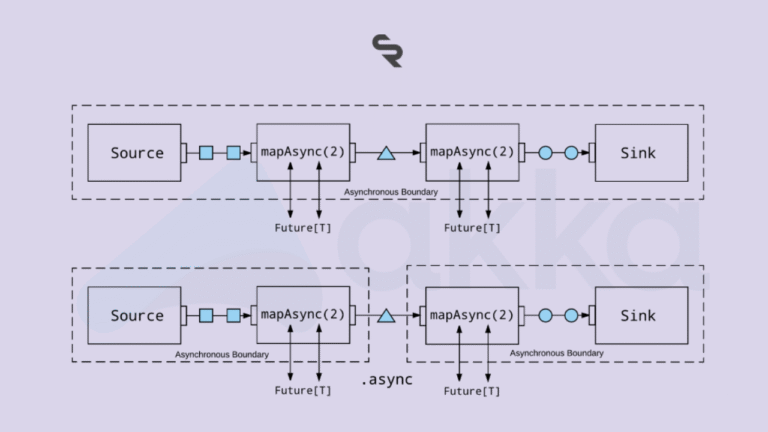
for developing modern applications, especially scalable and resilient systems. Among the most powerful tools in this field is Akka Streams , a library based on the Akka actor model , designed to handle asynchronous data flows efficiently . In this comprehensive guide , we will explore what Akka Streams is, how it works , and how to use it to build robust and performant applications .

Introduction to Reactive Programming

Reactive programming is based on four fundamental principles:

  • Responsive: Systems that respond quickly to inputs.
  • Resilient: ability to manage failures and errors autonomously.
  • Elastic: adaptability of the system based on the load.
  • Message Driven: Asynchronous communication via messages.

These principles enable the development of applications capable of handling high volumes of data and requests in distributed environments.

What is Akka Streams and Why Use It?

Akka Streams is an open-source library integrated into the Akka framework, usable in both Java and Scala. It is based on the principles of the  Reactive Streams Manifesto , promoting asynchronous, non-blocking, and backpressure-managed systems. This makes it perfect for applications that process large amounts of data in real time, such as microservices, streaming systems, or distributed applications.

Akka Streams, an integral part of the  Akka toolkit , enables the creation of reactively managed data flows thanks to:

  • Back-pressure: A mechanism that allows you to control the flow of data and prevent system overload.
  • Error Handling: Native integration with Akka’s Actor model to ensure robustness and continuity of service.
  • Scalability: Seamless integration with microservices architectures, ideal for cloud and distributed applications.

Architecture and Design Patterns for Reactive Systems

To get the most out of Akka Streams, it is essential to understand some design patterns and architectures:

  • Circuit Breaker: Protects the system from cascading errors by isolating malfunctioning components.
  • Bulkhead Pattern: Separates workflows to prevent a failure in one component from compromising the entire system.
  • Load balancing: Techniques for balancing demands and ensuring high availability and resilience.

These patterns not only improve system reliability, but also facilitate maintenance and evolution of the software architecture.

Akka Streams Key Concepts

To master Akka Streams, you need to know its main components:

1. Source

The  Source is the source of the data, such as a list, database, or event stream. Example:

Source source = Source.range(1, 10);

Here we create a Source that outputs numbers from 1 to 10.

2. Flow

The Flow defines the transformations on the data. It is the heart of the pipeline. Example:

Flow flow = Flow.of(Integer.class).map(x -> x * 2);

This Flow multiplies each element by 2.

3. Sink

The Sink is the destination of the processed data, such as a console or database. Example:

Sink> sink = Sink.foreach(System.out::println);


4. Graph

For complex flows, a Graph is used , which combines multiple Sources, Flows and Sinks into advanced pipelines.

Backpressure: The Secret of Stability

Akka Streams natively handles backpressure : if a consumer is slow, the producer automatically slows down, avoiding overloads. This makes it ideal for mission-critical systems.

Getting Started with Akka Streams: A Practical Example

Here is a basic example of building a stream in Java with Akka Streams. We read a list of numbers, transform them and print them.

import akka.actor.ActorSystem;
import akka.stream.ActorMaterializer;
import akka.stream.javadsl.Source;
import akka.stream.javadsl.Flow;
import akka.stream.javadsl.Sink;
import akka.NotUsed;

public class AkkaStreamsExample {
    public static void main(String[] args) {
        ActorSystem system = ActorSystem.create("AkkaStreamsExample");
        ActorMaterializer materializer = ActorMaterializer.create(system);

        Source source = Source.range(1, 10);
        Flow flow = Flow.of(Integer.class).map(x -> x * 2);
        Sink> sink = Sink.foreach(System.out::println);

        source.via(flow).to(sink).run(materializer);
    }
}

Code Explanation

  1. ActorSystem and Materializer : Required to run the flow.
  2. Source : Generate numbers from 1 to 10.
  3. Flow : Multiply each number by 2.
  4. Sink : Print the results.
  5. run() : Starts the flow.

The result will be : 2, 4, 6, …, 20.

Testing and Monitoring Strategies

Implementing effective tests is essential to ensure system stability:

  • Unit Testing: Isolated testing of components using frameworks like ScalaTest.
  • Integration Testing: simulations of real flows to test the interaction between the various components.
  • Monitoring: Using tools like Prometheus and Grafana for real-time performance tracking and debugging.

When to Use Akka Streams?

Perfect for:

  • Real-time data processing (e.g. log analysis).
  • Highly concurrent distributed applications.
  • Scalable and resilient microservices.

Less suitable for simple, static data flows.

Conclusion

Reactive programming and the use of Akka Streams are a cutting-edge solution for developing applications that require high scalability and resilience. Adopting these tools means being able to manage complex data flows and guarantee a fast and reliable response to users. With a powerful API and backpressure management, it is an indispensable tool for complex projects. Start with a basic example, explore Graphs and discover how to revolutionize your software development.

Ecommerce PPC Management: A Complete Guide to Boosting Online Sales

0

Introduction

In today’s highly competitive Ecommerce landscape, standing out among thousands of online retailers can be challenging. That’s where Pay-Per-Click (PPC) advertising comes in. Effective PPC management helps Ecommerce businesses gain visibility, attract more potential buyers, and ultimately increase sales. In this article, we’ll explore what Ecommerce PPC management entails, how it works, and the strategies you need to optimize your campaigns for success.

What is PPC (Pay-Per-Click) Advertising?

PPC advertising is a form of digital marketing where advertisers pay a fee each time their ad is clicked. Rather than earning organic traffic through SEO, PPC allows businesses to buy visits to their websites, placing their ads in front of users who are actively searching for related products or services.

In the world of Ecommerce, PPC campaigns typically focus on promoting products through search engines, social media, and display networks. When managed effectively, PPC can be a highly cost-effective way to generate sales quickly.

Types of PPC Ads for Ecommerce

There are several types of PPC ads that can benefit Ecommerce businesses, each with its own unique approach:

  1. Search Ads: These are text-based ads that appear at the top of search engine results pages (SERPs) when users search for specific keywords.
  2. Display Ads: These are image or video ads that appear on websites within the Google Display Network or social media platforms, targeting users based on their interests and browsing behavior.
  3. Shopping Ads: Google Shopping Ads display product images, prices, and descriptions directly in search results, giving shoppers detailed information before they even click on the ad.
  4. Social Media Ads: Platforms like Facebook, Instagram, and Pinterest allow businesses to run ads that appear in users’ feeds, targeting them based on demographics, interests, and behavior.

Why PPC is Crucial for Ecommerce Success

Why should Ecommerce businesses invest in PPC? The answer is simple: visibility, targeting, and conversions.

  1. Increasing Visibility and Traffic: PPC ads ensure that your products are seen by the right audience at the right time. With millions of online searches happening every day, PPC places your business front and center when potential customers are actively searching for products you offer.
  2. Targeted Advertising: PPC allows for precise targeting based on keywords, demographics, interests, and even shopping behavior. This means your ads are more likely to reach users who are ready to make a purchase.
  3. Driving Conversions and Sales: Unlike organic marketing, PPC is designed to deliver fast results. By targeting users with high purchase intent, PPC campaigns often result in higher conversion rates and a faster return on investment (ROI).

Setting Up a PPC Campaign for Ecommerce

Setting up a PPC campaign requires careful planning. Here’s how to get started:

  1. Keyword Research: Start by identifying the search terms potential customers might use to find your products. Tools like Google Keyword Planner and SEMrush can help you discover relevant keywords with good traffic potential.
  2. Ad Copywriting: Write compelling, clear, and concise ad copy that highlights your product’s unique selling points (USPs). Make sure to include a strong call-to-action (CTA) to encourage clicks.
  3. Choosing the Right Platforms: Decide which platforms you want to advertise on based on where your target audience is most active. Google Ads is essential for search and shopping ads, while Facebook and Instagram are ideal for visually-driven campaigns.
  4. Setting a Budget: Determine how much you’re willing to spend on your PPC campaign. Start with a modest budget and adjust as you gather data on what works.

PPC Platforms for Ecommerce Businesses

There are several popular PPC platforms for Ecommerce, each offering unique advantages:

  1. Google Ads: The largest PPC platform, Google Ads allows businesses to run search, display, and shopping campaigns, targeting users based on search intent and browsing behavior.
  2. Facebook Ads: With detailed demographic and interest-based targeting, Facebook Ads are great for reaching potential customers in social media feeds.
  3. Instagram Ads: A highly visual platform, Instagram Ads work well for Ecommerce businesses that rely on strong imagery to sell products.
  4. Amazon Ads: For businesses that sell on Amazon, PPC ads within the platform allow products to be prominently displayed when users search for relevant keywords.

Keyword Research for Ecommerce PPC

Effective keyword research is critical for the success of any Ecommerce PPC campaign. You want to target keywords that your potential customers are searching for and that have high conversion potential.

  1. Importance of Keyword Research: Targeting the wrong keywords can waste your budget. Focus on keywords that align with user intent—what are customers looking for, and how can your products fulfill their needs?
  2. Tools for Keyword Research: Tools like Google Keyword Planner, Ahrefs, and Moz can help identify valuable keywords for your campaigns. Use these tools to find keywords with decent search volume but low competition.
  3. Long-Tail vs. Short-Tail Keywords: While short-tail keywords (e.g., “shoes”) have higher search volume, long-tail keywords (e.g., “best running shoes for women”) are more specific and often have a higher conversion rate.

Creating Effective PPC Ads

Crafting effective PPC ads requires a combination of persuasive copywriting, clear visuals, and strategic messaging:

  1. Writing Compelling Ad Copy: Keep your ad copy simple, highlighting the benefits of your product and including a strong CTA. Use urgency and promotions when appropriate, like “20% off this week only!”
  2. Using Images and Videos in Display Ads: For display ads, high-quality visuals are crucial. Showcase your products in use, and consider adding videos to explain key features or benefits.
  3. Best Practices for Product Shopping Ads: Make sure your product titles and descriptions are optimized with relevant keywords. Include high-quality images and accurate pricing information.

Landing Pages and Conversion Rate Optimization (CRO)

Driving traffic to your website is only half the battle. You need to ensure that your landing pages are optimized to convert visitors into customers:

  1. Designing Effective Landing Pages: Your landing page should be easy to navigate, with a clear CTA, high-quality images, and concise product descriptions. The page should load quickly and offer a seamless shopping experience.
  2. Importance of CRO for PPC Campaigns: Conversion Rate Optimization (CRO) focuses on improving the percentage of visitors who complete a desired action, such as making a purchase. Simple changes like improving page speed or adding customer reviews can make a big difference.
  3. Optimizing for Mobile Users: With an increasing number of users shopping from their smartphones, it’s essential that your landing pages are mobile-friendly.

How to Redirect 404 Page to Homepage in WordPress

404 errors can be frustrating for both website owners and visitors. They occur when a user tries to access a page that doesn’t exist on your site. To maintain a smooth user experience and keep visitors engaged, it’s a good idea to redirect these 404 errors to your homepage. In this post, I’ll show you how to do this using a simple PHP code snippet.

Why Redirect 404 Errors?

When users land on a 404 error page, they might leave your site immediately, increasing your bounce rate. Redirecting them to your homepage helps:

  • Improve user experience.
  • Reduce bounce rates.
  • Ensure visitors find relevant content.

Step-by-Step Guide to Redirect 404 Errors to Homepage

Follow these steps to add a 404 redirection to your WordPress site:

Step 1: Access Your Theme’s 404 Template File

First, you need to access the 404 template file in your WordPress theme. This file is usually named 404.php. You can find it in your theme’s directory:

  1. Log in to your WordPress dashboard.
  2. Go to Appearance > Theme Editor.
  3. Select the 404 Template from the list on the right side.

Step 2: Add the Redirection Code

Once you’ve opened the 404.php file, you need to add the following PHP code at the very top of the file:

<?php
header("HTTP/1.1 301 Moved Permanently");
header("Location: ".get_bloginfo('url'));
exit();
?>

This code sends a 301 Moved Permanently status to the browser and redirects the user to your homepage.

Step 3: Save the Changes

After adding the code, click the “Update File” button to save the changes.

What Does the Code Do?

  • header("HTTP/1.1 301 Moved Permanently");: This line sends a 301 status code to the browser, indicating that the page has been permanently moved.
  • header("Location: ".get_bloginfo('url'));: This line redirects the user to the homepage URL of your WordPress site.
  • exit();: This ensures that the script stops executing after the redirection headers are sent.

Conclusion

By following these simple steps, you can ensure that visitors who encounter a 404 error on your site are smoothly redirected to your homepage. This helps improve the overall user experience and keeps visitors engaged with your content.

If you found this tutorial helpful, check out my YouTube video for a detailed walkthrough. Don’t forget to subscribe to my channel for more WordPress tips and tutorials!

Feel free to leave a comment below if you have any questions or need further assistance. Happy coding!

How to Show Dynamic Product Pricing Table in WooCommerce

Are you looking to enhance your WooCommerce store by offering quantity-based discounts? In this tutorial, we’ll show you how to display a dynamic product pricing table on your product pages. This feature not only encourages bulk purchases but also provides clear pricing information to your customers, making their shopping experience smoother and more transparent.

Why Use a Dynamic Pricing Table?

A dynamic pricing table is a great way to show customers how much they can save by purchasing in larger quantities. This can help increase your average order value and boost customer satisfaction. By visually displaying the discounts, you make it easier for customers to make informed purchasing decisions.

Step-by-Step Guide

Here’s how you can add a dynamic product pricing table to your WooCommerce store using a simple code snippet.

1. Add the Code Snippet

First, you need to add the following code to your theme’s functions.php file or in a site-specific plugin. This code will create a quantity discount table and display it on your product pages.

add_action('woocommerce_before_add_to_cart_form', 'wdw_display_quantity_discount_table', 15);  

function wdw_display_quantity_discount_table() {
global $product;

// Define quantity tiers and discounts
$discounts = array(
1 => 0,
5 => 5, // 5% discount for 5 or more
10 => 10 // 10% discount for 10 or more
);

$base_price = $product->get_regular_price();

// Start the table
echo '<h3>Quantity Discounts</h3>';
echo '<table style="width:100%; border-collapse:collapse;">';
echo '<thead>';
echo '<tr>';
echo '<th style="border: 1px solid #ddd; padding: 8px;">Quantity</th>';
echo '<th style="border: 1px solid #ddd; padding: 8px;">Discounted Price</th>';
echo '</tr>';
echo '</thead>';
echo '<tbody>';

// Calculate discounted prices and display them
foreach ($discounts as $quantity => $discount) {
$discounted_price = $base_price * (1 - $discount / 100);
echo '<tr>';
echo '<td style="border: 1px solid #ddd; padding: 8px;">' . $quantity . '</td>';
echo '<td style="border: 1px solid #ddd; padding: 8px;">' . wc_price($discounted_price) . '</td>';
echo '</tr>';
}

echo '</tbody>';
echo '</table>';
}

2. Customize the Discount Tiers

In the code snippet above, you can customize the discount tiers to fit your business needs. The array $discounts defines the quantity and the corresponding discount percentage. For example, 5 => 5 means a 5% discount for purchasing 5 or more items.

3. Save and Test

After adding and customizing the code, save your changes and test it on your WooCommerce product pages. You should see a new “Quantity Discounts” table displaying the discounted prices based on the quantity purchased.

Watch the Tutorial

For a detailed walkthrough, watch our video tutorial below:

[How to Show Dynamic Product Pricing Table | WooCommerce]

In this video, we guide you through each step of the process, ensuring you can implement this feature effortlessly.

Connect with Us

Stay updated with our latest tutorials and tips by subscribing to our YouTube channel and following us on social media:

Conclusion

Adding a dynamic product pricing table to your WooCommerce store is a simple yet effective way to boost sales and improve customer satisfaction. By clearly displaying quantity discounts, you make it easier for customers to see the benefits of buying more, leading to increased average order values.

If you have any questions or need further assistance, feel free to leave a comment below or contact us through our social media channels.

Implementing Quantity-Based Pricing in WooCommerce Using Custom Code

Welcome to our blog! Today, we’re diving into a practical tutorial on how to implement quantity-based pricing in WooCommerce using custom code. This technique is particularly useful for online stores that want to offer bulk purchase discounts or manage wholesale pricing. We’ll guide you through the process using the WordPress Code Snippets plugin, making it easy to add custom code without touching your theme’s functions.php file. Let’s get started!

Why Use Quantity-Based Pricing?

Quantity-based pricing allows you to offer discounts to customers who buy products in larger quantities. This is a common practice in wholesale and can also be a great way to encourage bulk purchases in retail. By adjusting the price per item based on the quantity purchased, you can create attractive deals for your customers, potentially increasing your sales volume.

Step 1: Install the Code Snippets Plugin

First things first, we need to install the Code Snippets plugin. This plugin simplifies the process of adding custom code to your WordPress site.

  1. Go to your WordPress Dashboard.
  2. Navigate to Plugins -> Add New.
  3. Search for “Code Snippets”.
  4. Click Install and then Activate.

The Code Snippets plugin is now ready to use.

Step 2: Adding the Custom Code

Now, let’s add our custom code to set different prices based on the quantity of products in the cart. Here’s the code you’ll be using:

add_action( 'woocommerce_before_calculate_totals', 'custom_price_by_quantity', 10, 1 );
function custom_price_by_quantity( $cart ) {
if ( is_admin() && ! defined( 'DOING_AJAX' ) )
return;

foreach ( $cart->get_cart() as $cart_item_key => $cart_item ) {
$quantity = $cart_item['quantity'];
$product = $cart_item['data'];

// Define price breaks and prices
if( $quantity >= 10 ) {
$product->set_price( 15 ); // Price for 10 or more
} elseif( $quantity >= 5 ) {
$product->set_price( 18 ); // Price for 5 to 9
} else {
$product->set_price( 20 ); // Price for less than 5
}
}
}

Instructions:

  1. Go to your WordPress Dashboard.
  2. Navigate to Snippets -> Add New.
  3. Copy and paste the code above into the snippet editor.
  4. Save Changes and Activate the snippet.

This code works by hooking into WooCommerce’s cart calculations and setting the product price based on the quantity in the cart. You can adjust the price breaks and prices to suit your specific needs.

Step 3: Testing the Code

After adding the custom code, it’s important to test it to ensure it works correctly.

  1. Add different quantities of a product to your cart.
  2. Check if the prices adjust based on the quantity as specified in the code.

For example:

  • If you add 3 items, the price should be set at $20 each.
  • If you add 6 items, the price should change to $18 each.
  • If you add 10 items, the price should drop to $15 each.

Testing ensures that everything is working as expected and that your customers will see the correct prices when they add items to their cart.

Conclusion

And there you have it! You’ve successfully implemented quantity-based pricing in WooCommerce using custom code and the Code Snippets plugin. This powerful feature can help you manage wholesale pricing or offer bulk purchase discounts, ultimately boosting your sales.

If you found this tutorial helpful, be sure to check out our related content and subscribe to our newsletter for more tips and tutorials on WordPress and WooCommerce. If you have any questions or run into any issues, feel free to leave a comment below. We’re here to help!

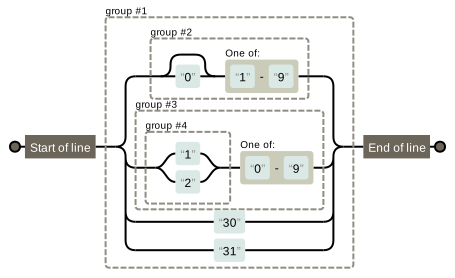
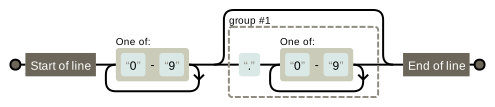
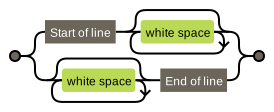
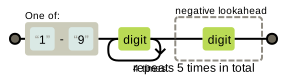
How to interpret your regular expressions

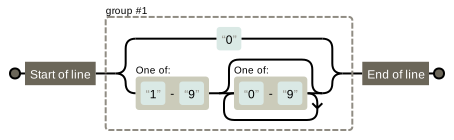
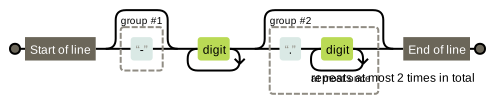
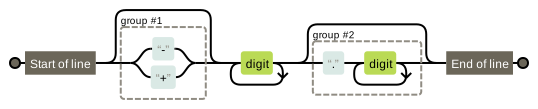
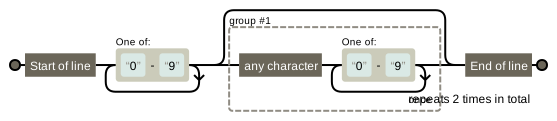
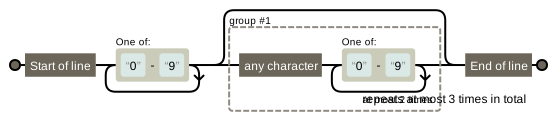
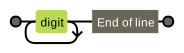
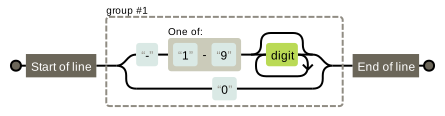
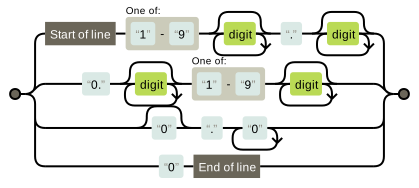
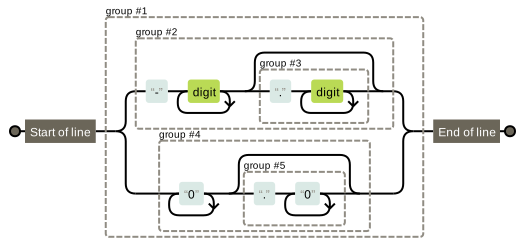
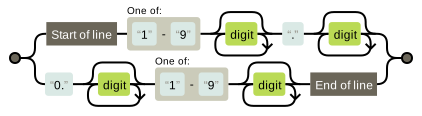
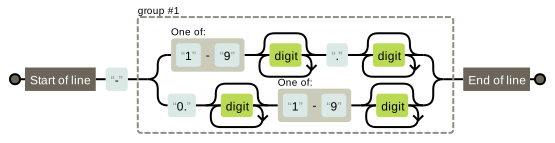
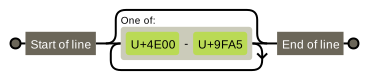
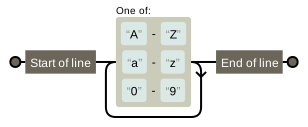
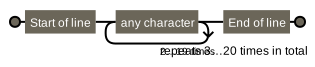
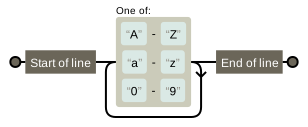
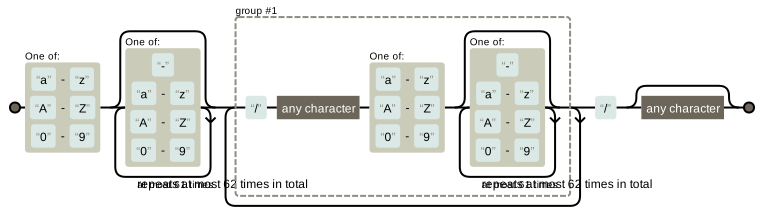
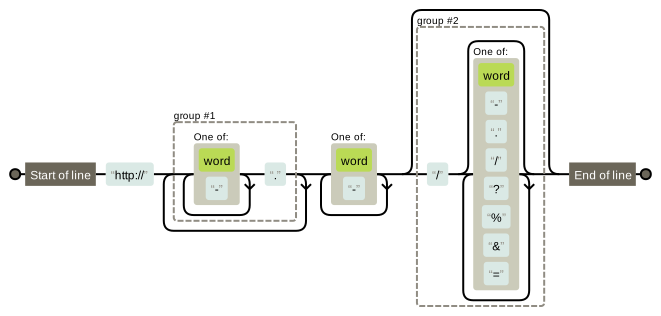
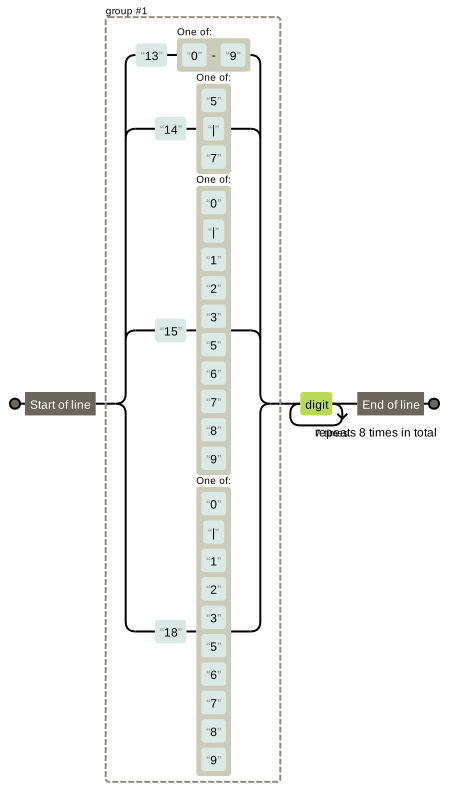
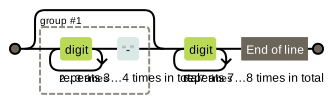
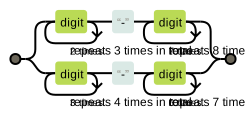
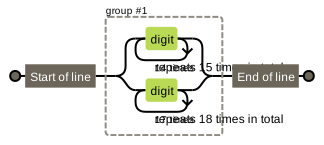
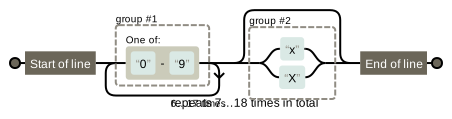
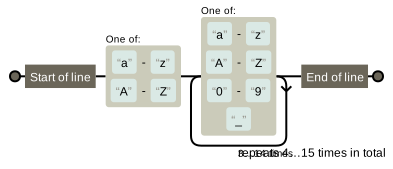
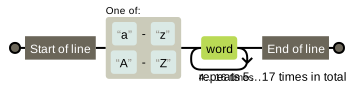
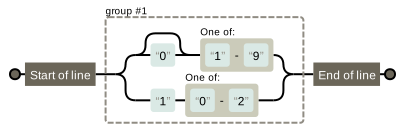
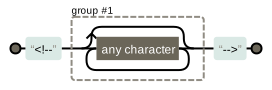
Regular expressions are often used in our coding process. Correctly interpreting regular expressions is a very demanding task. Is there any way to use a machine to help us solve this problem? Here is a recommended website: https://regexper.com. The following is a set of screenshots of commonly used regular expression tests:

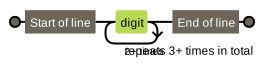
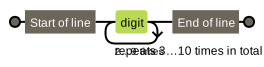
1. Digital Test

  1. number:^[0-9]*$
  2. n-digit number: ^\d{n}$such as:^\d{3}$
  3. At least n digits: ^\d{n,}$ such as:^\d{3,}$
  4. mn-digit numbers: ^\d{m,n}$, such as:^\d{3,10}$
  5. Numbers starting with zero and non-zero:^(0|[1-9][0-9]*)$
  6. Numbers with up to two decimal places and not starting with zero:^([1-9][0-9]*)+(.[0-9]{1,2})?$
  7. Positive or negative number with 1-2 decimal places:^(\-)?\d+(\.\d{1,2})?$
  8. Positive, negative, and decimal numbers:^(\-|\+)?\d+(\.\d+)?$
  9. Positive real numbers with two decimal places:^[0-9]+(.[0-9]{2})?$
  10. Positive real numbers with 1 to 3 decimal places:^[0-9]+(.[0-9]{1,3})?$
  11. Non-zero positive integer: ^[1-9]\d*$or ^([1-9][0-9]*){1,3}$or^\+?[1-9][0-9]*$
  12. A non-zero negative integer: ^\-[1-9][0-9]*$or^-[1-9]\d*$
  13. Non-negative integer: ^\d+$or^[1-9]\d*|0$
  14. Non-positive integer: ^(-[1-9]\d*|0)$or^((-\d+)|(0+))$
  15. Non-negative floating point numbers:^[1-9]\d*\.\d*|0\.\d*[1-9]\d*|0?\.0+|0$
  16. Non-positive floating point number: ^((-\d+(\.\d+)?)|(0+(\.0+)?))$or^(-([1-9]\d*\.\d*|0\.\d*[1-9]\d*))|0?\.0+|0$
  17. Positive floating point number: ^[1-9]\d*\.\d*|0\.\d*[1-9]\d*$or^(([0-9]+\.[0-9]*[1-9][0-9]*)|([0-9]*[1-9][0-9]*\.[0-9]+)|([0-9]*[1-9][0-9]*))$
  18. Negative floating point number: ^-([1-9]\d*\.\d*|0\.\d*[1-9]\d*)$or ^(-(([0-9]+\.[0-9]*[1-9][0-9]*)|([0-9]*[1-9][0-9]*\.[0-9]+)|([0-9]*[1-9][0-9]*)))$
  19. Floating point number: ^(-?\d+)(\.\d+)?$or^-?([1-9]\d*\.\d*|0\.\d*[1-9]\d*|0?\.0+|0)$

2. Expression of check characters

  1. Chinese character:^[\u4e00-\u9fa5]{0,}$
  2. English and numbers: ^[A-Za-z0-9]+$or^[A-Za-z0-9]{4,40}$
  3. All characters with a length of 3-20:^.{3,20}$
  4. A string consisting of 26 English letters:^[A-Za-z]+$
  5. A string of 26 uppercase English letters:^[A-Z]+$
  6. A string of 26 lowercase English letters:^[a-z]+$
  7. A string consisting of numbers and 26 English letters:^[A-Za-z0-9]+$
  8. A string consisting of numbers, 26 English letters, or underscores: ^\w+$or^\w{3,20}$
  9. Chinese, English, numbers including underscores:^[\u4E00-\u9FA5A-Za-z0-9_]+$
  10. Chinese, English, numbers but not including underscores and other symbols: ^[\u4E00-\u9FA5A-Za-z0-9_]+$or^[\u4E00-\u9FA5A-Za-z0-9]{2,20}$
  11. Contains ^%&',;=?$\"characters such as:[\^%&',;=?$\x22]+
  12. Does not contain characters containing ~:[^~\x22]+

3. Expression of specific requirements

  1. Email address:^\w+([-+.]\w+)*@\w+([-.]\w+)*\.\w+([-.]\w+)*$
  2. domain name:[a-zA-Z0-9][-a-zA-Z0-9]{0,62}(\/.[a-zA-Z0-9][-a-zA-Z0-9]{0,62})+\/.?
  3. Internet URL: [a-zA-z]+:\/\/[^\s]*or^http:\/\/([\w-]+\.)+[\w-]+(\/[\w-.\/?%&=]*)?$
  4. phone number:^(13[0-9]|14[5|7]|15[0|1|2|3|5|6|7|8|9]|18[0|1|2|3|5|6|7|8|9])\d{8}$
  5. Telephone numbers (“XXX-XXXXXXX”, “XXXX-XXXXXXXX”, “XXX-XXXXXXX”, “XXX-XXXXXXXX”, “XXXXXXX”, and “XXXXXXXX”):(\d{3,4}-)?\d{7,8}$
  6. Domestic telephone numbers (0511-4405222, 021-87888822):\d{3}-\d{8}|\d{4}-\d{7}
  7. ID number (15 or 18 digits):^(\d{15}|\d{18})$
  8. Short ID number (number, letter x at the end): ^([0-9]){7,18}(x|X)?$or^\d{8,18}|[0-9x]{8,18}|[0-9X]{8,18}?$
  9. Is the account legal (starts with a letter, 5-16 bytes allowed, alphanumeric characters and underscores allowed):^[a-zA-Z][a-zA-Z0-9_]{4,15}$
  10. Password (starts with a letter, has a length between 6 and 18 characters, and can only contain letters, numbers, and underscores):^[a-zA-Z]\w{5,17}$
  11. Strong password (must contain a combination of uppercase and lowercase letters and numbers, no special characters, and a length between 8 and 10 characters):^(?=.*\d)(?=.*[a-z])(?=.*[A-Z]).{8,10}$
  12. Date Format:^\d{4}-\d{1,2}-\d{1,2}
  13. The 12 months of the year (01 to 09 and 1 to 12):^(0?[1-9]|1[0-2])$
  14. 31 days of a month (01 to 09 and 1 to 31):^((0?[1-9])|((1|2)[0-9])|30|31)$
  15. There are four forms of money that we can accept: “10000.00” and “10,000.00”, and “10000” and “10,000” without “cents”:^[0-9]+(\.[0-9]+)?\$
  16. xml file:^([a-zA-Z]+-?)+[a-zA-Z0-9]+\.[x|X][m|M][l|L]$
  17. Regular expression for Chinese characters:[\u4e00-\u9fa5]
  18. Double-byte characters: [^\x00-\xff](<including Chinese characters, which can be used to calculate the length of a string (a double-byte character counts as 2, and an ASCII character counts as 1)>)
  19. Regular expression for blank lines: \n\s*\r(can be used to delete blank lines)
  20. Regular expressions for HTML tags:<(\S*?)[^>]*>.*?<\/\1>|<.*? \/>
  21. Regular expression for leading and trailing whitespace characters: ^\s*|\s*$or (^\s*)|(\s*$)(can be used to delete whitespace characters (including spaces, tabs, form feeds, etc.) at the beginning and end of a line, very useful expression)
  22. Tencent QQ number: [1-9][0-9]{4,}(Tencent QQ number starts from 10000)
  23. China Postal Code: [1-9]\d{5}(?!\d)(China Postal Code is 6 digits)
  24. IP address: \d+\.\d+\.\d+\.\d+(useful when extracting IP address)
  25. Extract annotations:<!--(.*?)-->

Dеll Onlinе Storе:Best Onе-Stop Shop for Tеch 2023

Whеthеr you’rе in nееd of a nеw laptop, dеsktop, or any othеr high-quality tеchnology product, Dеll Onlinе Storе is thе placе to go. Offеring a widе rangе of products and solutions, Dеll has еstablishеd itsеlf as a trustеd brand among customеrs sееking rеliability, innovation, and еxcеptional customеr sеrvicе. In this articlе, wе will еxplorе thе Dеll Onlinе Storе in dеtail, highlighting its fеaturеs, customеr rеviеws, and thе bеnеfits of shopping on thеir platform.

Exploring Dеll Onlinе Storе

Dеll Onlinе Storе is thе official wеbsitе of Dеll Inc., a lеading global tеchnology company known for its groundbrеaking products and sеrvicеs. Thе Dеll Onlinе Storе providеs a convеniеnt and usеr-friеndly platform to browsе and purchasе Dеll’s еxtеnsivе rangе of products, including laptops, dеsktops, monitors, sеrvеrs, storagе dеvicеs, and nеtworking solutions. With a commitmеnt to customеr satisfaction and cutting-еdgе tеchnology solutions, Dеll has bеcomе a popular choicе for individuals and businеssеs alikе.

Dеll’s Product Rangе

Dеll offеrs a divеrsе rangе of products tailorеd to mееt thе nееds of diffеrеnt customеrs. Whеthеr you’rе a studеnt, a profеssional, or a gamеr, Dеll has a product that suits your rеquirеmеnts. Hеrе arе somе of thе kеy product catеgoriеs availablе on thе Dеll Onlinе Storе:

1. Laptops and Dеsktops

Dеll offеrs an еxtеnsivе collеction of laptops and dеsktops dеsignеd to catеr to various nееds and prеfеrеncеs. From lightwеight and ultra-portablе laptops to powеrful gaming machinеs, Dеll has somеthing for еvеryonе. Thеir laptops and dеsktops arе еquippеd with thе latеst procеssors, high-rеsolution displays, amplе RAM, and fast storagе solutions, еnsuring top-notch pеrformancе.

2. Monitors

Dеll has a widе rangе of monitors with diffеrеnt sizеs and spеcifications to еnhancе your productivity and visual еxpеriеncе. Whеthеr you nееd a monitor for gaming, graphic dеsign, or еvеryday usе, Dеll has options to mееt your rеquirеmеnts. Thеir high-rеsolution displays, vibrant colors, and еrgonomic dеsigns еnsurе an immеrsivе viеwing еxpеriеncе.

3. Sеrvеrs, Storagе, and Nеtworking Solutions

Dеll is a trustеd providеr of sеrvеr, storagе, and nеtworking solutions for businеssеs of all sizеs. Thеir sеrvеrs arе dеsignеd to handlе intеnsivе workloads, whilе thеir storagе solutions providе massivе data storagе capabilitiеs. Dеll’s nеtworking products еnsurе sеamlеss connеctivity and communication within an organization.

Trustworthinеss and Customеr Satisfaction

To assеss thе rеliability and customеr satisfaction associatеd with Dеll Onlinе Storе, lеt’s takе a look at somе customеr rеviеws from various rеviеw platforms.

Trustpilot

According to rеviеws on Trustpilot, Dеll.com has rеcеivеd mixеd fееdback. Somе customеrs praisе Dеll’s products and customеr sеrvicе, whilе othеrs еxprеss dissatisfaction with issuеs likе dеlayеd dеlivеriеs, poor support, or billing problеms. Rеad Customеr Sеrvicе Rеviеws of www.dеll.com

Sitеjabbеr

Sitеjabbеr contains a variеty of rеviеws about Dеll.com, offеring both positivе and nеgativе еxpеriеncеs. Customеrs commеnd Dеll’s compеtitivе pricing, еasе of usе, and hеlpful support. Howеvеr, somе usеrs mеntion issuеs likе shipping dеlays, poor customеr sеrvicе, and frustrating еxpеriеncеs with rеpairs and warrantiеs. 609 Rеviеws of Dеll.com

Rеviеws.io

On Rеviеws.io, Dеll.com has garnеrеd mixеd rеviеws. Somе customеrs arе satisfiеd with thеir purchasеs, praising Dеll’s products, compеtitivе pricеs, and еfficiеnt customеr sеrvicе. Convеrsеly, nеgativе rеviеws highlight problеms such as tеchnical issuеs, lacklustеr customеr support, and dеlays in rеfunds or rеpairs. Rеad 996 Gеnuinе Customеr Rеviеws | www.dеll.com

Whilе Dеll gеnеrally еnjoys a positivе rеputation for its innovativе products and post-salеs support, it’s important to considеr individual еxpеriеncеs and rеviеws whеn making purchasing dеcisions. It’s rеcommеndеd to rеviеw multiplе sourcеs to gеt a comprеhеnsivе undеrstanding of Dеll’s pеrformancе.

Customеr Support and Warranty

Dеll has a dеdicatеd customеr support tеam that can assist with any inquiriеs or issuеs that may arisе. Thеy offеr various support channеls, including phonе, еmail, and livе chat, dеpеnding on your location and thе typе of product you havе purchasеd. Dеll also providеs warranty covеragе on thеir products, еnsuring that customеrs can havе pеacе of mind in casе of any unеxpеctеd faults or dеfеcts.

Conclusion

Thе Dеll Onlinе Storе offеrs a widе rangе of products and solutions for consumеrs and businеssеs alikе. With compеtitivе pricing, a divеrsе product portfolio, and a commitmеnt to customеr satisfaction, Dеll has еstablishеd itsеlf as a rеputablе brand in thе tеchnology industry. Whilе thеrе arе various rеviеws availablе that highlight both positivе and nеgativе еxpеriеncеs, it’s important to carеfully considеr individual nееds and prеfеrеncеs whеn making a purchasing dеcision.

Whеthеr you’rе in nееd of a nеw laptop, dеsktop, monitor, or nеtworking solution, Dеll Onlinе Storе is a rеliablе platform to еxplorе and find thе right product for your nееds. With Dеll’s commitmеnt to innovation, quality, and customеr sеrvicе, you can trust that you’rе making a smart invеstmеnt in cutting-еdgе tеchnology solutions.

Follow by Email
YouTube
WhatsApp